
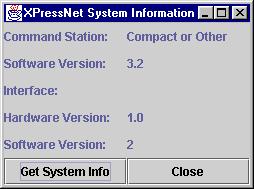
The XpressNet System Information tool is used to determine what hardware is connected to the system.
The top two lines indicate the Command Station type and software version that is connected to your computer. This information is read as part of the auto configuration process when JMRI first starts, but can be re-read using the "Get System Info" button.
Below the Interface field, the hardware and software version of the computer interface are
displayed.
These values are only shown after clicking on "Get System Info"
The image shows the results obtained by pressing the "Get System Info" button with a Software version 2 LI101F connected to an atlas Commander with software 3.2.
Clicking on "Close" will close the pane.
Back to the XpressNet Help page