
We use Java Swing for our GUI development. It's a lot more powerful than the original AWT, and the price is right. In particular, we try to use the "Bean format" of setting and getting members, call-backs to notify of changes, etc, to make it easier to build applications from JMRI components.
We have been evolving a particular pattern for using Swing, described here. The JMRI codebase contains several generations of implementations, so not all of it looks like this, but we're moving classes in this direction as time allows.
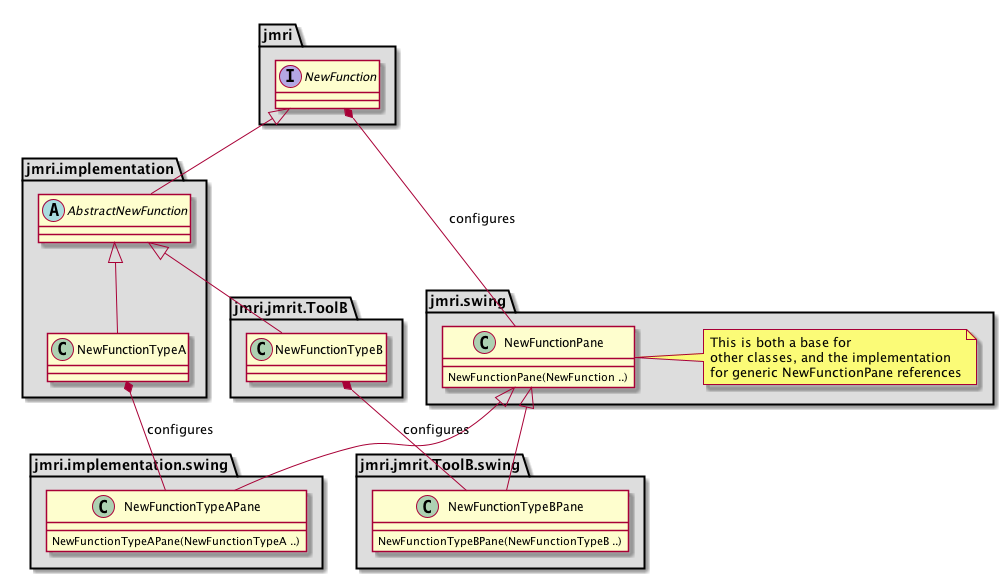
The basic structure is:
swing in the package path. For example,
prefer putting Swing code in jmri.jmrit.vsdecoder.swing or a subpackage of
that, instead of putting it in jmri.jmrit.vsdecoder itself. This helps keep
the other code non-Swing-specific, e.g. so it can be used with other toolkits or on
systems without graphics. This pattern is similar to the way that ConfigureXml code lives in separate .configurexml
packages.
MouseAdapter
as a way of getting events for mouse pressed, mouse clicked, and mouse released. These will
differ on different platforms and with different hardware, and it extremely unlikely that
any code you write will do a better job of decoding all that.
The jmri.util.swing package contains the support code.
Dispose is called at the end. (Note that JPanels don't have a dispose(), that's normally only part of JFrames, but we provide it here for cleanup)
JmriPanels are best created by name with JmriNamedPaneAction, which has the advantage of greatly reducing the number of classes that need to be loaded to populate a menu.
To create an action, e.g. for a menu item, the simplest form is:
new jmri.util.swing.JmriNamedPaneAction("Log4J Tree", "jmri.jmrit.log.Log4JTreePane");
The first argument is the human-readable name, and the 2nd is the name of the panel class.
An example of a fuller form:
 new jmri.util.swing.JmriNamedPaneAction(Bundle.getMessage("MenuItemLogTreeAction"),

          new jmri.util.swing.sdi.JmriJFrameInterface(),

          "jmri.jmrit.log.Log4JTreePane");
If you need specialized initialization that can't be built into the JmriPanel itself via
it's initComponents and initContext(..) methods, perhaps to make
decision about connections, make a specialized Action class by extending
jmri.util.swing.JmriNamedPaneAction, providing the appropriate constructors, and
including a @Override public JmriPanel makePanel() method that does any
case-specific initialization that's needed before the panel can be used. For an example (may
have been changed) see
If none that can be used, look into using JmriAbstractAction as the base for a separate class implementing Action.
If you're using JmriPanels as described above, JMRI also provides tools for creating menus, toolbars, button fields, etc more easily.
Generic creation of menus, toolbars and navigation trees from XML definition files are provided by the jmri.util.swing.JMenuUtil, jmri.util.swing.JToolBarUtil, and jmri.util.swing.JTreeUtil classes
I18N of those menus, toolbars and trees is then done via the XML content in the usual way.
JMRI provides three different ways of embedding JmriPanels in windows:
Each of those then provides an implementation of WindowInterface that creates new windows, subwindows or other constructs as needed, so as to put panels in the right place.
(See the jmri.util.swing package Javadocs for more information
Prefer use of jmri.util.swing.WrapLayout to java.awt.FlowLayout, because WrapLayout properly handles the case of its contents wrapping into two lines. When that happens, FlowLayout will often not display the second line.
jmri.util.swing.JmriJOptionPane is preferred over javax.swing.JOptionPane. The Modality of the latter will block the whole JVM UI until they are closed. This causes issues with Always on Top Frames, which will also be blocked, potentially with the Dialog hidden behind the Frame.